What Is a Restaurant POS System? A Complete Guide
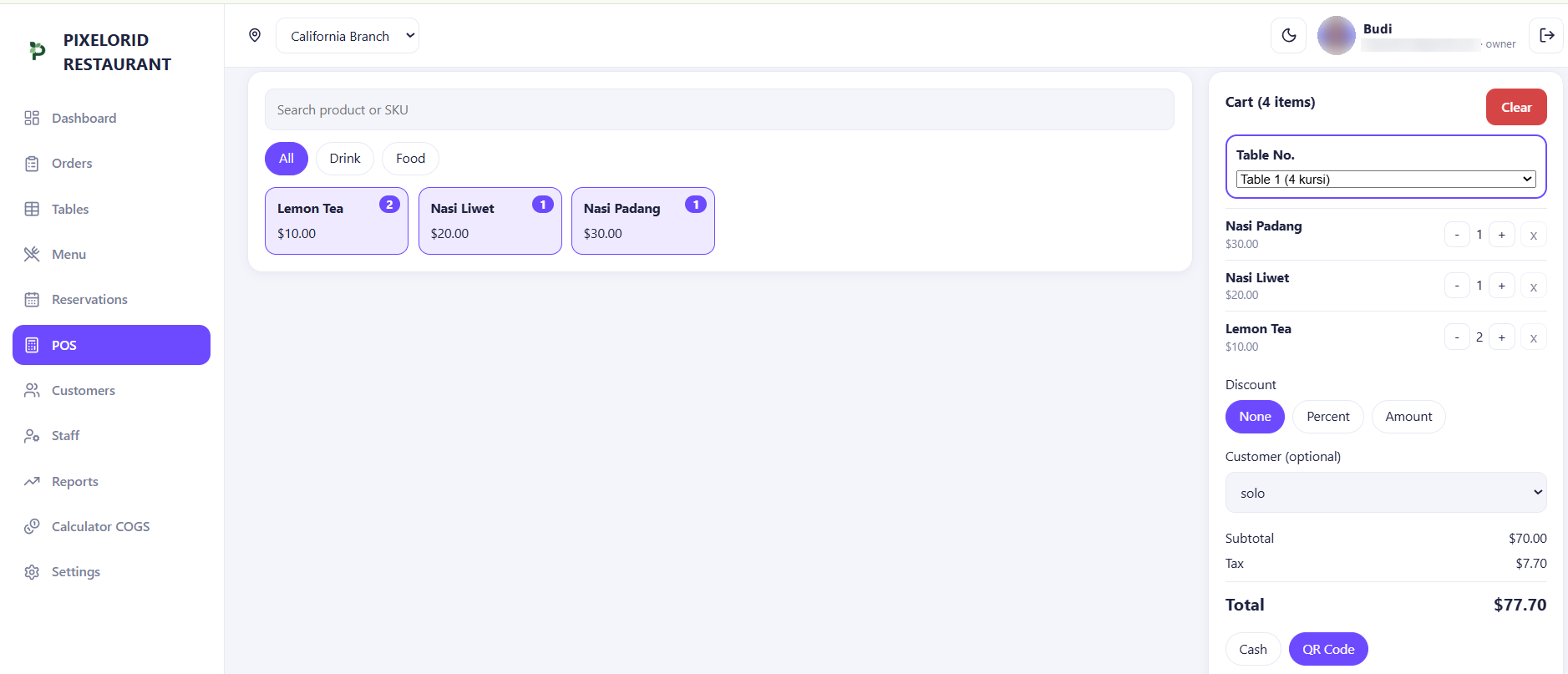
What is a restaurant POS system?
A restaurant POS system (point of sale) is the software, and sometimes the hardware, your team uses to record orders, calculate bills and take payment. It is where a sale actually happens: a guest orders, staff enter the order, the guest pays, and the sale is recorded.
Modern systems usually run on a tablet, phone, computer or touchscreen terminal. Many are cloud-based, which means they work in a web browser and keep your data online instead of on a single computer in the back office.
What a restaurant POS does day to day
The exact feature set differs from product to product, so always confirm it before you commit. In general, a restaurant POS handles these jobs:
- Taking orders, for example by table, for takeaway or for counter service
- Calculating totals, including discounts and taxes where the system is set up for them
- Accepting payments such as cash, card or QR, depending on how it is configured
- Showing or printing receipts for guests
- Recording every sale so you can review it later
- Giving each team member their own login with limited permissions
Restaurant POS vs restaurant management software
The two terms overlap, and vendors often use them loosely. A useful way to tell them apart is by scope. A POS focuses on the moment of sale. Restaurant management software covers the wider operation around that moment.
- A POS typically covers orders, billing, payments and receipts.
- Restaurant management software typically adds things like table and reservation handling, customer lists, staff roles, menu and cost management, and reports across one or more branches.
Many products combine both in one system. If you want to see what that broader category looks like, read about restaurant management software. A very small business may be fine with a simple POS, while a growing restaurant often benefits from having everything in one place.
Features that matter most
Speed and ease of use
Your staff will use the POS during the busiest hours. If taking an order takes many taps or needs a manual to understand, service will slow down and training will take longer.
Table and order handling
If you run a dine-in restaurant, check that orders can be tied to tables and that staff can add items to an open order. Counter-service cafes may care more about quick one-step orders.
Payment options
Confirm which payment methods the system records and how it shows cash received and change. Also ask whether any payment processing is handled inside the system or only recorded by it, because those are different things.
Menu management
You should be able to add dishes, change prices and organise categories yourself, without waiting for a vendor.
Staff roles and permissions
A cashier does not need to see your profit reports. Look for separate roles so each person only sees what their job requires.
Reporting
Sales totals, best-selling dishes and payment method breakdowns are the basics. Check that you can export data, for example to a spreadsheet, so you are not locked in.
How to choose a restaurant POS system
Start from how your restaurant actually works, then compare options against that. These questions help:
- Does it fit your service style, such as dine-in, takeaway, counter service or a mix?
- What is the full cost? Ask about subscription fees, hardware, payment fees and anything that is charged extra.
- How quickly can a new employee learn it?
- Which devices does it run on, and do you need to buy special hardware?
- Will you really use the reports it offers?
- What support and documentation are available if something goes wrong?
- Can you export your data if you decide to switch later?
- Is there a free trial so you can test it with real orders?
If a trial is available, test it during a real service rather than only watching a demo. Problems usually show up under pressure, not in a quiet afternoon.
Limitations to be aware of
A POS is a useful tool, but it has limits. Knowing them early avoids surprises.
- It records what happens in your restaurant, but it cannot fix problems with your process or your menu pricing.
- Reports are only as accurate as the data entered. Wrong prices or missing items lead to wrong numbers.
- Cloud-based systems depend on an internet connection. Ask the vendor what happens when the connection drops.
- Not every POS includes inventory tracking, accounting, payroll or delivery-platform integrations. Check what is covered and plan for separate tools where needed.
- Hardware such as printers and cash drawers needs to be compatible. Verify this before you buy anything.
Where PIXELORID RESTO fits
PIXELORID RESTO combines a POS with the other tools a restaurant uses every day. It runs in your browser, so there is no app to install. You can take orders by table, record cash and QR payments, manage tables, reservations and customers, build your menu, and use the built-in COGS calculator to see what each dish costs you.
Owner, manager and cashier roles control who sees what, reports show net sales, gross profit, payment methods and best sellers, and you can run more than one branch from a single account (see how a multi-branch restaurant POS works). Orders and reports can be exported to Excel.
PIXELORID RESTO does not include a dedicated inventory module, so if stock counting is essential for you, you would need a separate tool for that part. There is a 7-day free trial, so you can test it with your own menu before you decide.
A short checklist before you decide
- Write down how your orders and payments work today.
- Shortlist two or three systems that match.
- Trial each one with your real menu and real staff.
- Check the full cost and what happens if you leave.
- Choose the one your team finds easiest to use.
The best restaurant POS system is the one your team uses correctly every day. Simple, clear and reliable usually beats long feature lists you will never open.
Run your restaurant with PIXELORID RESTO
POS, orders, tables, reservations, menu and reports in one practical system.